 AI & ML
 MOBILE APP DEVELOPMENT
 AI-Powered Solutions
 Business App Solutions
 TRAVEL BOOKING ENGINE
 TRAVEL PORTAL DEVELOPMENT
 FRONTEND
 MOBILE
 Trending Technology
 ABOUT COMPANY
 AI & ML
 MOBILE APP DEVELOPMENT


Generative AI for Internal Tools: Building a Knowledge Assistant Your Team Will Actually Use
Your company already knows the answer to most questions employees ask. It sits in a PDF, a SharePoint folder, a Confluence page, or an old email thread. The hard part is finding it.
Internal AI knowledge assistants are meant to solve this, yet many struggle after launch. The model is rarely the cause. Employees stop using a tool when they cannot trust its answers, cannot see where an answer came from, or find it slower than asking a coworker.
This guide explains how an internal knowledge assistant works, what makes people adopt it, what goes wrong, and when a custom generative AI development project is justified.
Why Most Internal AI Knowledge Tools Fail
The underlying business problem is familiar:
- Information is scattered across drives, wikis, CRM and ERP systems, and inboxes
- Knowledge is trapped in long documents nobody reads
- Employees ask the same questions again and again
- Internal search returns files, not answers
- Knowledge leaves when experienced people leave
- New hires take a long time to become productive
- Documentation is outdated, and there is no single source of truth
An assistant fails when it is placed on top of this mess without fixing it. The usual causes are:
- Answers are wrong or outdated, so trust disappears
- No sources are shown, so nobody can verify an answer
- Permissions are handled badly, so the tool is either unsafe or too restricted to be useful
- It cannot reach the systems where the real information lives
- There is no way to report a bad answer
- The content is never updated after launch
- It lives in a separate app, outside the tools people already use
Each of these is a design problem with a known fix. The sections below cover them in turn.
What Is a Generative AI Knowledge Assistant?
A generative AI knowledge assistant is an internal tool that answers employee questions in plain language, using your company’s own documents and systems as its source. Employees ask a question as they would ask a colleague. The assistant finds the relevant internal content, writes a direct answer, and shows the documents it used.
It differs from a general chatbot in one important way: it should answer from approved company knowledge, not from the model’s general training.
How an Enterprise AI Knowledge Assistant Works
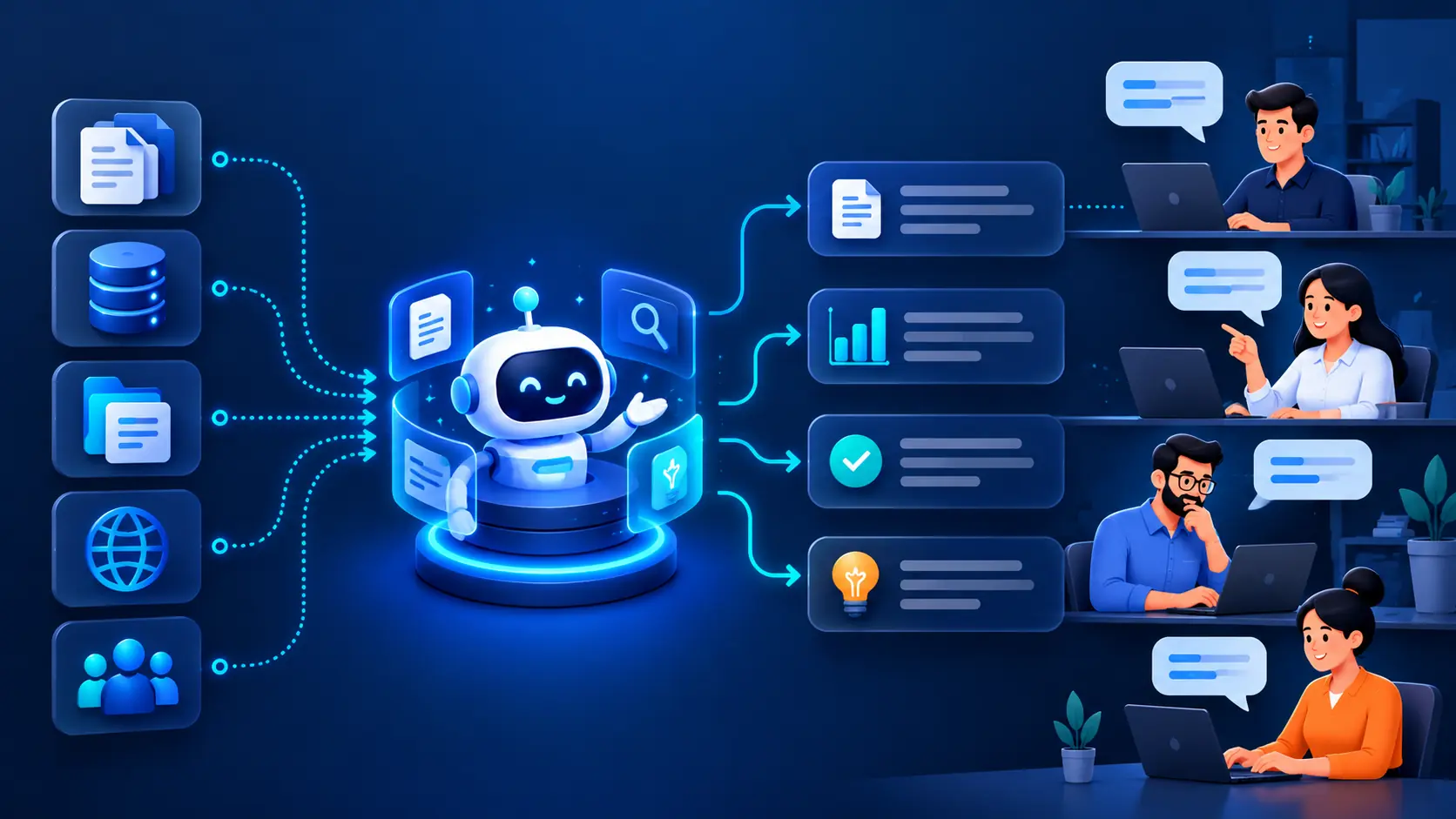
In simple terms, the system has four layers: your data, a retrieval layer that finds the right content, a language model that writes the answer, and an application layer that handles the interface, permissions, and logging.
The process runs in these steps:
- Internal data sources. Policies, SOPs, contracts, wikis, tickets, and records in tools such as SharePoint, Google Drive, Notion, or Confluence.
- Document ingestion. Connectors pull content in and keep it in sync when documents change.
- Parsing and chunking. Documents are converted to clean text and split into small passages.
- Embeddings. Each passage is converted into a numeric representation of its meaning.
- Vector database. These representations are stored so the system can search by meaning, not just keywords.
- Retrieval. When someone asks a question, the system finds the most relevant passages the user is allowed to see.
- Response generation. A large language model (LLM) writes an answer using only those passages.
- Source citations. The answer links to the documents it drew from.
- User feedback. Ratings and corrections flow back to improve content and retrieval.
Steps 6 and 7 together are called retrieval augmented generation, or RAG.
Why RAG and Source Grounding Matter
RAG matters because a language model on its own knows nothing about your company. Without retrieval, it will either refuse to answer or produce a confident guess, often called a hallucination.
Why not simply connect ChatGPT to company data? Uploading files to a general chat tool can work for one person and a handful of documents. It breaks down for a company because a model can only read a limited amount of text at once, uploaded files go out of date, and there is no control over who sees what. This is the problem RAG development solves: the system retrieves only the relevant, current, permitted passages for each question.
Source grounding means every answer is tied to an approved company source. A well-grounded assistant should:
- Answer only from approved sources, and say so when it cannot
- Show citations so employees can verify the answer in one click
- Prefer the newest or official version when documents conflict, and flag the conflict
- Display document dates so outdated information is visible
- Respond with “I could not find this” and offer a human contact, instead of guessing
That last rule matters most. An honest “I don’t know” protects trust. A wrong answer delivered confidently destroys it.
Permissions and Security: Who Can See What?
An employee should only receive answers based on information they are authorized to see. If a salary file or a legal memo can surface in the wrong person’s answer, the project will be shut down, and rightly so.
Good access control includes:
- Role-based and department-level access, so HR, finance, and legal content stays within those groups
- Document-level permissions inherited from the source system, so the assistant respects what SharePoint or Drive already enforces
- Filtering before generation, so restricted passages never reach the model for that user
- Special handling for sensitive data, such as HR records, financial data, contracts, and customer information
Recommendation: reuse existing permissions from your source systems where possible. Maintaining a second, separate permission model is where mistakes usually happen.
Feedback Loops: How to Make the Assistant Better Over Time
An assistant is only as good as its content, and content decays. Feedback is how you find the gaps.
- Thumbs up and down, or “Was this answer helpful?”
- A simple way to report incorrect information, with a comment
- A log of unanswered questions, which shows what documentation is missing
- A view of frequently asked topics, which shows where to invest first
- Regular review of answer quality by a named content owner
Feedback only helps if someone acts on it. Assign ownership before launch.
What Makes Employees Actually Use It?
Adoption depends on experience more than on model quality. Employees keep using an assistant that is:
- Fast. Slower than asking a coworker means it loses.
- Accurate and cited. People trust what they can check.
- Where they already work. Slack or Microsoft Teams integration beats a separate portal.
- Familiar and simple. It should need little or no training.
- Available on mobile, where field or frontline staff need it.
- Clear about escalation. When it cannot help, it should point to the right person.
Internal AI Knowledge Assistant Use Cases
| Department | What the assistant answers |
| HR | Leave policy, benefits, handbook questions |
| IT helpdesk | Access requests, setup guides, common fixes |
| Customer support | Product details, troubleshooting steps, past resolutions |
| Sales enablement | Pricing rules, product comparisons, proposal content |
| Legal | Clause lookups and contract terms, with citations |
| Finance | Expense rules, approval limits, policy questions |
| Operations | SOPs and process steps |
| Engineering | Architecture notes, runbooks, API documentation |
| Procurement | Vendor terms, purchasing rules |
| Onboarding | Role-specific guidance for new hires |
Start with one department where questions are frequent and documents are in good shape.
Enterprise Search vs ChatGPT vs RAG vs Custom LLM
| Solution | Best for | Limitations | Typical use case |
| Traditional enterprise search | Finding known documents | Returns files, not answers | Locating a policy by name |
| AI chatbot | Scripted or general questions | No company knowledge unless added | Website or basic FAQ bot |
| ChatGPT integration | Adding general AI features to an app | Limited grounding and permissions | Drafting and summarizing |
| RAG knowledge assistant | Answers from internal documents | Depends on data quality | HR, IT, or support assistant |
| Custom LLM application | Complex needs across many systems | Higher cost and maintenance | Company-wide knowledge platform |
| AI agent | Taking actions, not just answering | Needs strict guardrails | Resetting access, raising tickets |
Which do you need?
- You only need to locate documents: improve enterprise search.
- You need general writing or summarizing help: ChatGPT integration services are usually enough.
- You need trusted answers from internal knowledge: build a RAG knowledge assistant.
- You need many systems, strict permissions, or custom workflows: plan a custom application through LLM app development.
- You need the assistant to act on answers: consider AI agent development, once the answering stage is reliable.
How to Build an AI Knowledge Assistant: Step by Step
- Identify business use cases. Pick one team and its most common questions.
- Audit internal knowledge sources. List where the answers live and who owns them.
- Clean and organize data. Remove duplicates and outdated versions.
- Build retrieval. Set up ingestion, chunking, and search. See our RAG development services.
- Add permissions and security. Enforce access rules at retrieval.
- Connect the LLM. Choose a model that fits your accuracy, cost, and data requirements.
- Add citations and feedback. Build both in from the first version.
- Test with real employees. Use real questions and compare answers against a prepared set of correct ones.
- Launch. Start with one group, inside the tools they already use.
- Monitor and improve. Review feedback, gaps, and quality on a schedule.
Common Implementation Mistakes
- Building before the use case is clear
- Feeding in poor-quality or conflicting documents
- Shipping without source citations
- Treating access control as a later phase
- Ignoring hallucinations instead of designing a “no answer” response
- Having no evaluation framework, so quality cannot be measured
- Collecting no employee feedback
- Trying to index everything at once
- Focusing on the model and neglecting the user experience
- Not measuring adoption
How to Measure AI Knowledge Assistant Success
| KPI | What it tells you |
| Answer accuracy | Whether answers match verified correct ones |
| Search success rate | How often a question gets a useful answer |
| User adoption and repeat usage | Whether people come back |
| Time saved | Effort removed from finding information |
| Unanswered questions | Where documentation is missing |
| Escalation rate | How often a human is still needed |
| Employee satisfaction | Whether the tool is trusted |
| Knowledge freshness | How current the source content is |
Set a baseline before launch. Without one, you cannot show improvement.
Security and Privacy Considerations
Beyond permissions, settle these points with your security and compliance teams:
- Data privacy: what content is sent to the model, and whether sensitive fields should be masked
- Model and provider choice: hosted API or privately hosted model. Read the provider’s current data terms yourself, since they change
- Encryption: in transit and at rest
- Audit logs: who asked what, and which sources were used
- Data retention: how long questions and answers are stored
- Compliance: the rules that apply to your industry and region
When Should a Business Build a Custom AI Knowledge Assistant?
An off-the-shelf tool or basic chatbot is often enough when your content lives in one or two systems and permissions are simple. Consider a custom build when:
- Knowledge is spread across many systems, including CRM or ERP data
- You need document-level permissions that existing tools cannot honor
- Answers must follow specific business rules or approval steps
- You need the assistant inside your own products or workflows
- You want control over model choice, hosting, and cost
OneClick IT Solution builds these systems as part of its generative AI development work. If you are unsure which route fits, our AI consulting services team can assess your data and use case first.
Cost and Development Timeline
How Much Does an AI Knowledge Assistant Cost?
There is no fixed price. Cost depends on:
- Number of users and volume of questions
- Data volume and the number of source systems
- LLM or API usage
- Vector database and hosting
- Security and compliance requirements
- Custom interface and enterprise integrations
- Ongoing maintenance and monitoring
Ask vendors to itemize these, and include running costs, not only the build.
How Long Does It Take to Build?
It depends on scope, integrations, data quality, security requirements, and complexity. A single-department assistant on clean data is a much smaller project than a company-wide platform. Data preparation and permissions usually take longer than connecting the model.
Enterprise AI Knowledge Assistant Checklist
- Data sources: identified, with named owners
- Data quality: duplicates and outdated versions removed
- RAG: retrieval tested on real questions
- Source citations: shown on every answer
- Permissions: enforced at document level
- Security: encryption, audit logs, and retention defined
- LLM: chosen for accuracy, cost, and data requirements
- Integrations: available in Slack, Teams, or existing tools
- Feedback: rating and reporting built in
- Monitoring: quality and usage reviewed regularly
- Evaluation: a fixed test set of questions and correct answers
- User experience: fast, simple, with clear human escalation
Reader’s reality
A knowledge assistant earns its place when employees trust it enough to use it daily. That trust comes from grounded answers, visible sources, correct permissions, and steady improvement, more than from the choice of model.
Done well, the result is faster access to knowledge, fewer repeated questions, quicker onboarding, better retention of what your company knows, and more consistent decisions.
If you are evaluating generative AI development for an internal assistant, start with one use case and clean data. If you would like help scoping it, you can request a free AI readiness review.
FAQs
What is a generative AI knowledge assistant?
It is an internal tool that answers employee questions in plain language using your company’s own documents and systems, and shows the sources behind each answer.
How does RAG work for enterprise knowledge management?
RAG retrieves the most relevant passages from your internal content for each question, then gives them to a language model to write the answer. The model answers from your documents instead of its general training.
How can businesses prevent hallucinations in internal AI tools?
You cannot remove them entirely, but you can reduce them. Ground answers in approved sources, show citations, instruct the assistant to say when it cannot find an answer, and test regularly against known correct answers.
Is a knowledge assistant better than traditional enterprise search?
It depends on the task. Search is fine for finding a known document. A knowledge assistant is better when employees need a direct answer drawn from several documents.
How do AI knowledge assistants handle employee permissions?
A well-built assistant checks the user’s access rights at retrieval, so restricted content never reaches the model for that user. Ideally it inherits permissions from the source systems.
What is the difference between RAG and a custom LLM?
RAG is a method for supplying a model with your content at the moment of the question. A custom LLM application is a full system built around your data and workflows, and it often uses RAG as one component.